thisandthat

CUE THIS, CUT THAT.

AI tools that take the manual work out of live streaming and video editing.

映像配信と編集の手作業を、AIで減らすツール群。

thisandthat makes four focused tools for the people who run live streams and edit them afterwards. They cover the whole show: slides before it, timing and audience questions during it, and the multi-camera edit after it. Three run in the browser and have public demos; one is a macOS app.

thisandthat は、配信を運営する人と、収録を編集する人のための4つのツールです。本番前のスライド、本番中の進行管理と質問受付、本番後のマルチカメラ編集まで、配信の一連の流れをカバーします。3つはブラウザで使えて、ログインなしで試せるデモもあります。1つはMacアプリです。

  • Founded創業2025
  • Founder代表Kazuma Nishiwaki西脇 和馬
  • Based in拠点Japan日本
  • Productsプロダクト4 (3 live on the web, 1 macOS app)4つ(Web公開中 3 / Macアプリ 1)
  • Built with開発Claude Code

Reel

The four tools in 38 seconds38秒で見る4つのツール

html-pptx, Que, QA Board and Movie Switcher, in the order they are used: before, during and after the show. No sound.本番前・本番中・本番後の順に、html-pptx、Que、QA Board、Movie Switcherを紹介しています。音声なし。

Tools

Four tools, one show4つのツール

Claude

How we use ClaudeClaudeの使い方

Claude is part of how the tools are built and how they are used. The next releases move it into the products themselves through the Claude API.

Claudeは、ツールを作るときにも、ツールを使うときにも組み込まれています。次のリリースでは、Claude APIを使ってプロダクトそのものに組み込みます。

TODAY現在
  • All four

    Built with Claude Code. All four tools are designed and developed with Claude Code.

    Claude Codeで開発。4つとも、Claude Codeを使って設計・開発しています。

  • html-pptx

    Runs inside Claude Code. It ships as a Claude Code Skill and an MCP server, so Claude can write slides in HTML and export them as editable PowerPoint in one step.

    Claude Codeの中で動く。Claude CodeのSkillとMCPサーバーとして提供していて、ClaudeがHTMLでスライドを書き、そのまま編集できるPowerPointに書き出せます。

  • Que

    Takes AI-drafted run sheets. A timetable drafted with Claude can be pasted as plain text (19:00-19:05 Opening) and goes live at once.

    AIで下書きした進行表をそのまま使える。Claudeで作った進行表を 19:00-19:05 オープニング の形式で貼り付ければ、すぐに本番で使えます。

NEXT · CLAUDE API次のリリース · Claude API
  • Que

    Draft a full run of show, with cues, from an event brief or script.

    イベントの概要や台本から、合図まで含めた進行表を下書きする。

  • QA Board

    Group duplicate questions and summarize them for the moderator in real time.

    似た質問をまとめ、運営向けに要約をリアルタイムで出す。

  • Movie Switcher

    Write chapters, titles and a summary from the transcript of each recording.

    収録の文字起こしから、チャプター・タイトル・要約を作る。

01 — Before the show01 — 本番前thisandthat.jp/html-pptx

html-pptx

Turns HTML slides into PowerPoint files you can still edit.

HTMLで組んだスライドを、編集できるPowerPointに書き出します。

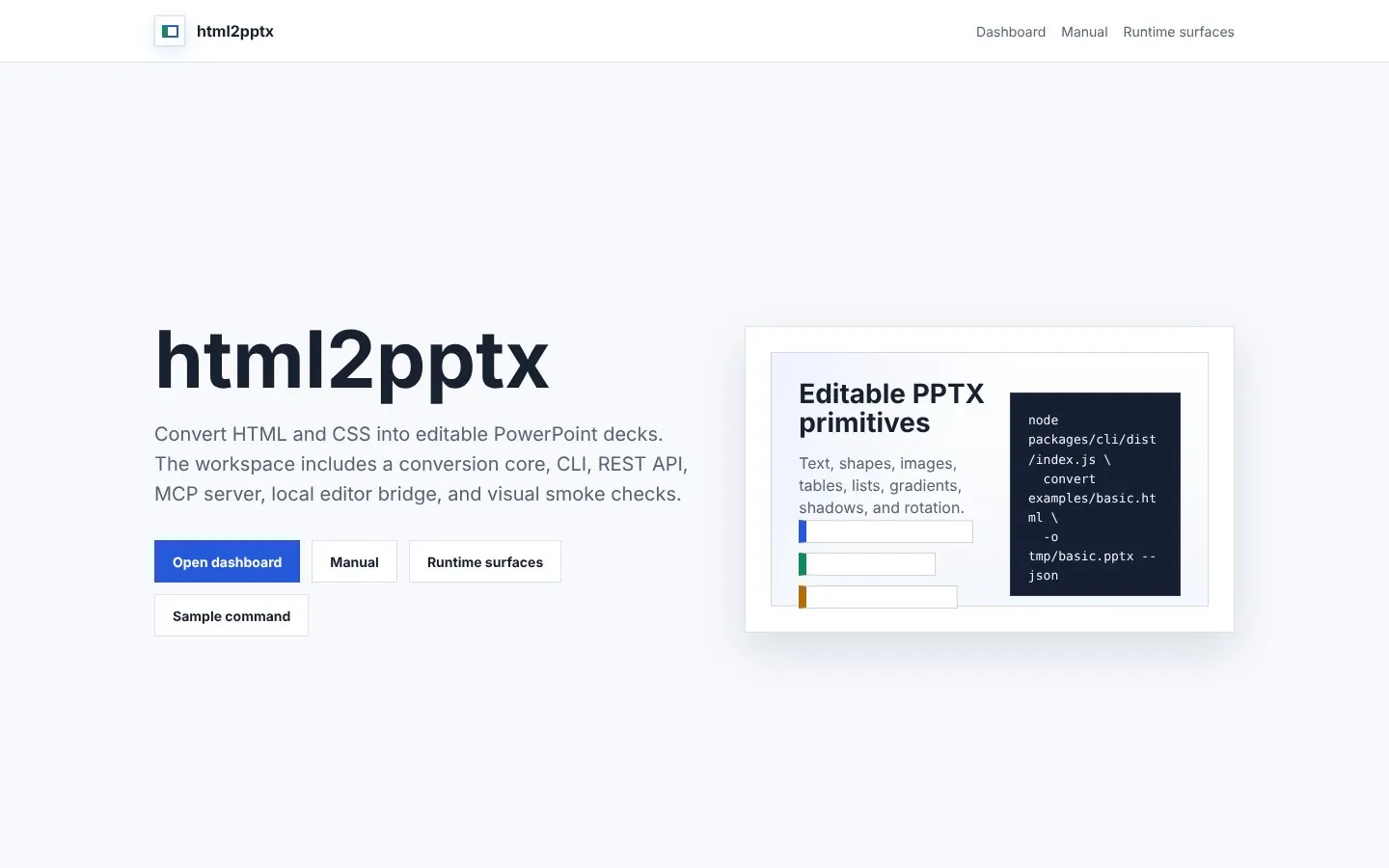
It lays out HTML/CSS in a real browser, measures every element, and rebuilds text, shapes, images and tables as native PowerPoint objects. Nothing is flattened into a screenshot, so a typo can be fixed after export.

ブラウザで実際にレイアウトしたHTML/CSSを計測し、テキスト・図形・画像・表をPowerPointの要素に置き換えます。画像の貼り付けではないので、書き出した後も文字を直せます。

Good forこんなときに

  • Delivering slides made with AI or HTML as a PowerPoint file
  • Fixing text on stream slides after they are exported
  • Adding slide export to a script or CI pipeline
  • AIやHTMLで作ったスライドを、PowerPointで納品したい
  • 配信用のスライドを、あとから文字だけ直したい
  • スライドの書き出しを、スクリプトやCIに組み込みたい

Key features主な機能

Export
Editable .pptx with text, shapes, images and tables as separate objects
Canvas
1600 × 900 px (16:9), converted at 1 in = 120 px
Interfaces
CLI, REST API (async jobs, webhooks, signed downloads), MCP server, Claude Code Skill
Pre-flight
diagnose finds elements that will not convert cleanly
書き出し
編集可能な .pptx。テキスト・図形・画像・表をそれぞれの要素として出力
サイズ
1600 × 900 px(16:9)を基準に、1 in = 120 px で換算
使い方
CLI、REST API(非同期ジョブ・Webhook・署名付きダウンロード)、MCPサーバー、Claude CodeのSkill
事前チェック
diagnose で、崩れそうな要素を書き出し前に特定
html-pptx home page with links to the dashboard, manual and runtime surfaces
html-pptx home pagehtml-pptxのトップページOpen html-pptx ↗html-pptxを開く ↗
02 — During the show02 — 本番中thisandthat.jp/timekeep

Que

Puts the run of show, time left and stage cues on every crew member's phone.

進行表の残時間・合図・連絡を、出演者とスタッフのスマホにリアルタイムで届けます。

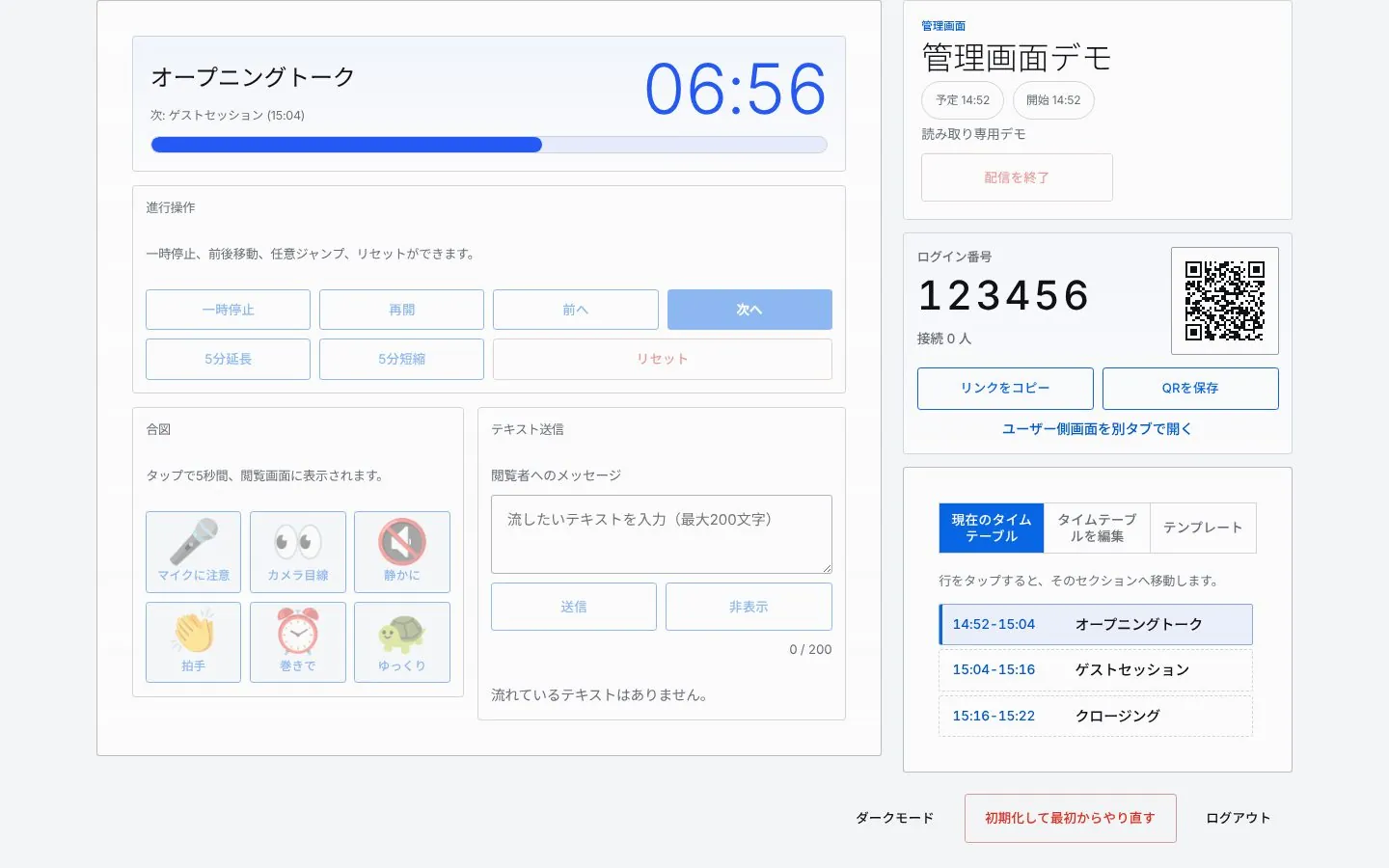
The producer runs the timetable from an admin screen, and presenters and crew see the remaining time, cues and messages update live. Viewers join with a 6-digit code or a QR code, with no sign-up.

管理者がタイムテーブルに沿って進行を操作すると、閲覧画面にすぐ反映されます。閲覧する人はログイン不要で、6桁のコードかQRコードから参加できます。

Good forこんなときに

  • Showing presenters the time left and cues in a streaming studio
  • Stretching or cutting a segment by five minutes mid-seminar
  • Reusing the run of show for a weekly stream
  • 配信スタジオで、出演者に残時間と合図を伝えたい
  • オンラインセミナーで、押し巻きをその場で調整したい
  • 定例配信の進行表を、テンプレートで使い回したい

Key features主な機能

Adjust
+5 / −5 minutes, applied live
Alerts
Beeps at halfway, at 10, 5, 3 and 1 minute left, and on overtime
Cues
Mic check, look at camera, quiet, applause, wrap up, slow down
Messages
Up to 200 characters, shown large on every screen
Scale
About 100 viewers per session, with automatic reconnect
時間調整
+5分 / −5分 を本番中にそのまま反映
アラート
半分経過、残り10・5・3・1分、時間超過で音が鳴る
合図
マイク注意、カメラ目線、静かに、拍手、巻き、ゆっくり
連絡
最大200文字のテキストを閲覧画面に大きく表示
規模
1セッション100人程度。切断時は自動で再接続
Que admin screen showing the countdown, controls, cues, join code and timetable
Que admin screen, public demoQueの管理画面(公開デモ)Try the admin demo ↗管理画面のデモを試す ↗
03 — During the show03 — 本番中thisandthat.jp/qa

QA Board

Collects audience questions and shows presenters only the ones the moderator approves.

参加者の質問を集めて、運営が選んだ質問だけを登壇者の画面に並べます。

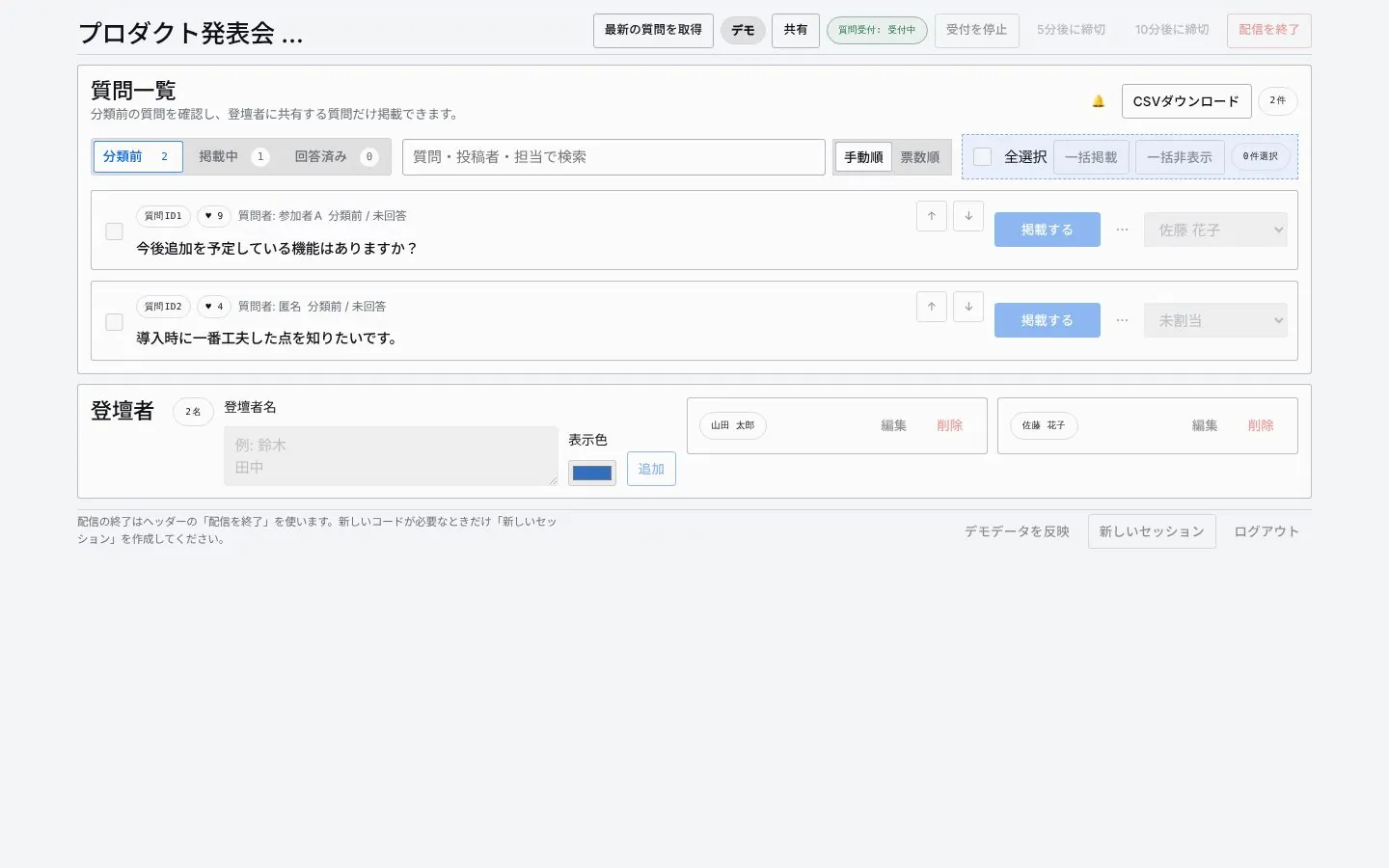
Attendees post with a 3-digit code and no account. The moderator approves, orders and assigns each question; the presenter screen shows the current question large and the rest as a queue.

参加者は3桁の質問コードを入れるだけで、ログインせずに投稿できます。運営は管理画面で、掲載する質問と順番、担当する登壇者を決めます。

Good forこんなときに

  • Taking audience questions during a streamed event
  • Giving presenters a curated, ordered list instead of a raw feed
  • Putting questions on the stream through OBS
  • イベント配信で、参加者から質問を受け付けたい
  • 登壇者には、運営が選んだ質問だけを順番に見せたい
  • 質問をOBSで配信画面に載せたい

Key features主な機能

Posting
3-digit code, 2–500 characters, name optional
Moderation
Publish, hide or delete, reorder, assign a presenter, track answer status
Presenter view
Current question large, the queue below
Projection
OBS mode with a transparent background and no controls
投稿
質問コードで参加。本文は2〜500文字、名前は任意
管理
掲載・未掲載・削除、並べ替え、担当登壇者、回答状況
登壇者画面
先頭の質問を大きく、続きを順番待ちとして表示
投影
OBS向けの投影モード。背景を透過でき、操作ボタンは出ない
QA Board moderator screen listing questions with publish and reorder controls
QA Board moderator screen, public demoQA Boardの管理画面(公開デモ)Try the moderator demo ↗管理画面のデモを試す ↗
04 — After the show04 — 本番後macOS appMacアプリ

Movie Switcher

Listens for who is speaking and cuts a multi-camera recording automatically.

話者を聞き分けて、マルチカメラ映像のカット割りと字幕を自動で作ります。

It detects the active speaker from each camera's lavalier mic, transcribes with Whisper, and builds an edit plan with captions that opens in Premiere Pro as a timeline. Everything runs locally on the Mac.

全体カメラと寄りカメラの映像から、カメラごとのピンマイクの音量で話者を検出します。Whisperの文字起こしと組み合わせて編集計画を作り、Premiere Proで開けるタイムラインを書き出します。処理はすべてMacの中で完結します。

Good forこんなときに

  • Turning around talk and panel recordings faster
  • Switching to whoever is speaking without manual cutting
  • Finishing in Premiere Pro from a captioned timeline
  • 対談やパネルディスカッションの収録を、早く仕上げたい
  • カメラの切り替えを、話している人に合わせて自動で組みたい
  • 字幕付きのタイムラインから、Premiere Proで仕上げたい

Key features主な機能

Input
One wide camera plus up to four close-up cameras
Speakers
Per-camera mic levels, or imported diarization (JSON, RTTM)
Transcription
Whisper large-v3, on device
Export
Premiere Pro XML (Final Cut Pro 7 format), SRT captions, shot list (JSON)
入力
全体カメラ + 寄りカメラ最大4台
話者検出
カメラごとのピンマイク音量。外部の話者分離データ(JSON・RTTM)も読み込める
文字起こし
Whisper large-v3(端末内で処理)
書き出し
Premiere Pro用XML(Final Cut Pro 7形式)、字幕(SRT)、カット一覧(JSON)
macOS app · available on requestMacアプリ · 個別に配布しています

Data

Data and privacyデータの扱い

About

About thisandthatthisandthatについて

thisandthat started in 2025 in Japan. We build small, focused tools for the people who run live streams and edit them afterwards: producers, stage managers, moderators and editors.

Each tool takes over one job that is usually done by hand, and AI handles the parts that used to need a person watching.

thisandthat は、2025年に日本で始まりました。配信を運営する人と収録を編集する人、つまりプロデューサー、進行、モデレーター、編集者のための小さなツールを作っています。

ひとつのツールが、手作業になりがちな仕事をひとつずつ引き受けます。人が張り付いて見ていた部分は、AIが受け持ちます。

Founded
2025
Founder
Kazuma Nishiwaki
Based in
Japan
Products
html-pptx, Que, QA Board (web) · Movie Switcher (macOS)
Stack
Cloudflare Workers, Durable Objects and D1 · Node.js and Playwright · Python and Tauri on macOS
Website
thisandthat.jp
Contact
kazuma@thisandthat.jp
創業
2025年
代表
西脇 和馬
拠点
日本
プロダクト
html-pptx、Que、QA Board(Web)/ Movie Switcher(Mac)
技術
Cloudflare Workers・Durable Objects・D1 / Node.js・Playwright / Python・Tauri(Mac)
Webサイト
thisandthat.jp
お問い合わせ
kazuma@thisandthat.jp